
the interior of a casement room in brick fort in north carolina

For months, I’ve been needing to shut down my old blog and archive my old posts. And I finally found a solution: blog.sh!

Although the term “blog” was coined in 1997, I didn’t write my first post until 2002. I started blogging defensively. What happened was that I would start drafting an email to one person, then think “Oh, this other person would be interested too” and add them, but then realize that some of what I was writing wasn’t really appropriate for them, so then I would make two emails and have to copy and paste and edit. Finally, I realized I could just put all of the “public” info — the things I didn’t care if anyone read — into a blog post and only send specific emails to particular people.

I had been exploring wikis at the time, using PHPWiki and saw that there was a mechanism to do daily posts using a calendar interface. I used that for a couple of years but then decided to switch to using Drupal for blogging. My blog resided at blog.bierfaristo.com and my first post was on Dec 14, 2005. By this time I was also getting interest from other organizations who wanted to set up websites that were effectively blogs: the Amherst Democratic Town Committee and Esperanto League for North America (now Esperanto-USA) so I set up Drupal websites for them as well.

I was tangentially involved when the University of Massachusetts Amherst decided to standardize on Drupal as their content management system. I had been using it for a few years at that point. They brought in a focus group and had two presentations: one was by a Drupal consultant and the other was for a commercial product that was a static-site generator. I could see the attraction of using the static-site generator. But I knew that the campus would need to accept content via the web and, their only solution for that was to hand-write one-off PHP scripts. That sounded like a disaster from a security standpoint.

One of the short-comings of Drupal was that it was difficult to update: point updates were pretty easy, but each major update required migrating the content and completely retheming the site. And when Drupal 8 came out they basically threw out all of the expertise anyone had developed by completely redesigning the entire system and made managing the dependencies so complex you needed a separate tool (composer). So, I gave up on Drupal and never updated from Drupal 7.

A lot of other people did as well. Some folks created a fork called backdrop that rejected the changes that Drupal 8 had made. I had initially considered switching to that as well, but they had decided not to support the antiquated “blog” system and it required migrating the content into a different content type. So I didn’t bother making the switch.

During this period of time I had also started using Twitter and eventually also set up a separate Twitter feed for my author work. I quit using it and finally deleted my accounts when Twitter started being run by a Nazi. I grabbed archives of my feeds before I did so. But I wasn’t quite sure what to do with them.

When I set up my author blog (where you’re reading this post), I decided to use WordPress. Mainly, as I’ve written elsewhere, this was because I could get my hosting service to manage the install and keep it up-to-date. It works OK, although I’ve been worried about security as AI is being used to find vulnerabilities. But I try to use relatively few modules and make sure they stay updated. So far, I haven’t had any problems. Early on, the security in WordPress was execrable, which was in part why I went with Drupal as a CMS. It seems better now.

In the interim, my old blog site still languished on Drupal 7. I hadn’t used it in several years. Even though Drupal 7 had been end-of-lifed a couple of times, people still kept patching it to keep it working. But finally, they said they really, really, really were going to stop. And, in April, I started getting a daily email whining that it really was EoL and needed to be taken down. So I was interested when I saw the announcement about blog.sh that was optimized for building an archive site.

I was particularly interested in a static site generator for an archive because I wanted something that wouldn’t require maintenance. It wasn’t something I would necessarily watch all the time and so I didn’t want to have to think about managing security. I wanted something that could just sit there.

I used it to set up the blog for Elegant Lich and that worked pretty well. So I decided to create an archive site: archive.bierfaristo.com and begin migrating content into it. I migrated the blog posts first. And I was able to import my twitter feeds.

I still have a few outstanding challenges. I tried to migrate my blog from Esperanto-USA, but that blog has been gone a long time: I tried to grab some posts from the wayback machine but have only been partially successful. I was an early user of Flickr and I still have a lot of images there. Phil and I used an early version of lychee to build image galleries. When they switched to a new new system, the upgrade looked complicated, so I never updated that either and it’s kind of orphaned. I don’t see these as high priorities. But things I can work on if I feel like it.

I have lost some things. I think I failed to grab a backup from the brief time I was at mastodon.lol. I don’t think I’ll bother to grab my history from Facebook. I very rarely wrote anything specifically for Facebook. Early on, you could gateway your posts from Twitter to Facebook, but they killed that after a while. I mostly wrote for my blog and then shared links there. They never got much traction because, of course, Facebook’s whole business model is to hide things you post from your friends unless you pay them.

I’m not expecting anyone to be that interested in my old posts anyway. But I can often remember an old post where I mentioned something or linked to something, and I’ll be interested to look things up, link to things, or share them again when they’re relevant.

The author of blog.sh seemed a little surprised at how quickly I found his system and started using it. I think I saw his original announcement at Mastodon: someone must have boosted it into my feed. I’ve identified a handful of minor problems that he’s promptly fixed. And I made one feature request that’s in the works too. (I offered to try to try to write the feature myself, which he politely declined. I really didn’t want to learn how to write in Ruby anyway, but I felt compelled to offer.)

And when this blog has run it’s course, I should be able to easily pull it into my archive site as well. It’s a nice feeling to have this long standing problem resolved.

NO AI pin from DuckDuckGo

Most of the giant corporations have gotten the memo that their oligarchic overlords want them to shove AI into everything, whether people want it or not. I’ve written previously about my position vis-à-vis AI and how I avoid using AI for anything. The net result is that I have to spend a fair amount of time trying to figure out how to turn AI off in things.

It’s a constant battle. Last year, at least twice, I had to go into the settings of Zoom to turn off every single AI setting so that Zoom would not constantly try to beg participants in any meeting I hosted to turn on their spybot. And that happened yet again when they added some new chatbot and a note taking service. I’ve discovered that some people have no idea how dangerous these things can be. There was a local story about a school committee that went into executive session to candidly discuss litigation where one of these tools was running. It helpfully mailed the transcript to everyone, including members of the public. People treat Zoom sessions as an informal discussion — not a place where every word will be recorded and shared publicly. (After I succeeded in turning it off, I noticed a page that suggested they were going to start charging $10/month for it. I wonder how many people will use it if they have to pay for it…)

Some companies have gotten the memo. I was pleased when DuckDuckGo created a NO-AI search landing page. I have set my default engine everywhere to it. It’s nowhere near as good as search engines used to be, but at least it doesn’t have AI summaries. Last year, DuckDuckGo ran a survey to ask whether people wanted AI in search results or not. They gave away pins to some people who responded and boosted the survey in social media, and I got one! It’s pictured above. I wear it proudly.

Unfortunately, there is a lot of AI junk that’s hard to avoid or turn off directly. That’s why I was so pleased to discover the Disable AI WordPress plugin. When I first discovered it, it was still in a very early version with hardly any installs. I did my due diligence to inspect the source to figure out what it was doing (and make it sure didn’t appear to do anything nefarious.) It basically uses CSS to set the visibility of AI buttons and interfaces to false, so they don’t show up in the interface. It’s awesome! It’s unfortunate we have to depend on adversarial coding, but thank goodness for Free Software that makes that possible!

To be clear, there are many domains where various kinds of machine learning have already been effective and will continue to be transformative. But that doesn’t mean I want to be forced to ever use it. So I’ll keep doing whatever it takes to push back.

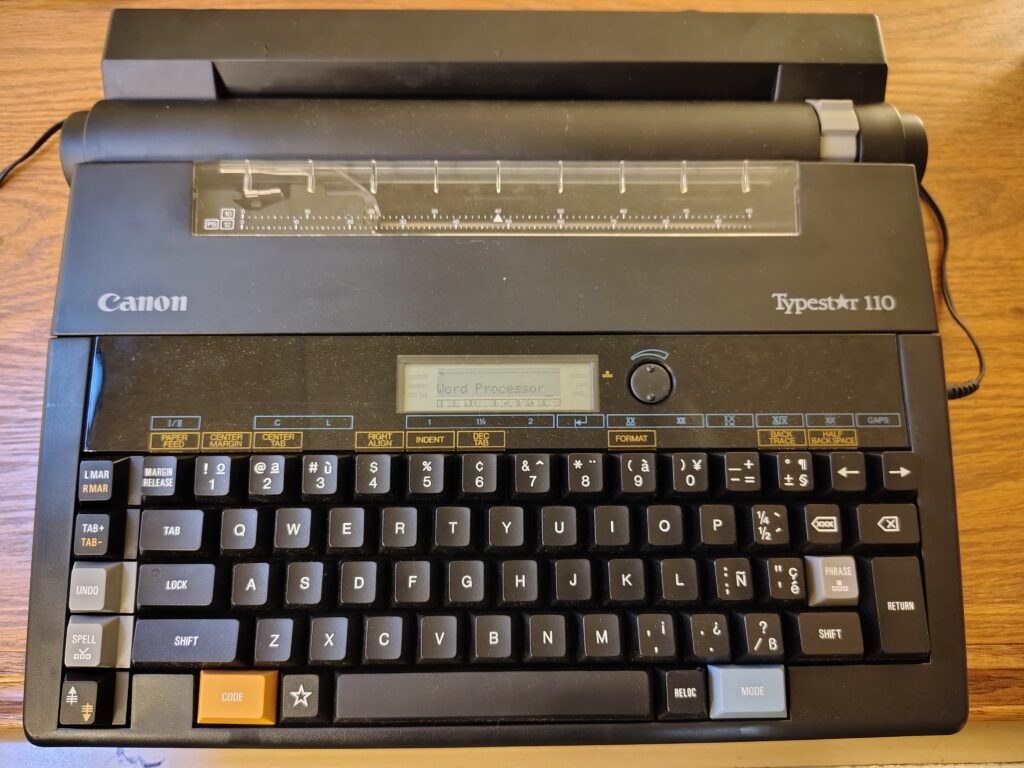
odd typewriter word processor hybrid manufactured by Canon in the early 1980s. It has a lcd display where someone has typed "word processor."

I use a text editor for pretty much all of my draft writing. I can date this pretty much to 1993, when Microsoft Word 6.0 was released. It really sucked and, after many years of using a word processor, I quit using one for writing.

I did most of my early writing by hand or using a typewriter. I took “secretarial typing” in high school — they changed the name that year to “business typing” which was perceived as less sexist. I was the only boy in the class. There was a “personal typing” class that required students to learn to type 45 words per minute. But in secretarial typing, you needed to learn touch typing (to not look at the keyboard) and type 60 words per minute. It was perhaps the single most useful class I ever took in my life.

I also learned to use DEC computers with a paper terminal in high school. Mostly, I was programming in BASIC. There was rather crude text editing, but I could see the potential for writing text. There was a text formatting program called RUNOFF that I experimented with a little bit, but it was too complicated for my purposes and so I never actually used it for anything. But I could see the potential.

When I went to college, my family purchased a Smith Corona electric typewriter for me as a gift for going to college.

As an undergraduate, I learned to use a word processing system — maybe ALL-IN_1 — on the VAX computer at Alma College. It used a “gold key” to access formatting commands and you could do a lot of amazing things. I had been using my typewriter to write papers, but quickly switched to writing everything using the word processor.

Around that time, a friend kept asking to borrow my typewriter. I didn’t mind since it wasn’t like I used it anymore: once you got used to using the word processor, the idea of going back to using a typewriter was a monstrous impossibility. I kept suggesting that he learn to use the word processor, but he always claimed to not have time. So I finally said I would type his paper for him using the word processor.

There was a central terminal room, but we went to a small computer lab in the life science building. I logged in and quickly typed his paper. Then I printed it using the dot-matrix printer in the lab. He looked at it skeptically, then said, “Yeah. OK. But it has a widow.”

“Let’s fix that,” I said. I typed a few keystrokes and printed again. When I handed him the output, his eyes got bigger and bigger and bigger.

“You can print it again?” he breathed.

He got an account the next morning.

I had other computers along the way (including the odd typewriter/wordprocessor hybrid pictured above) but when I started graduate school, I bought a Powerbook 100 and a copy of Microsoft Word 5.1. It was amazing. It was perhaps the best word processing system I ever used. I used it to write all my papers as a graduate student, including my gigantic 200 page dissertation that had 88 figures and 15 tables.

Then Word 6.0 came out and it was garbage. It was clunky and unstable. It frequently crashed and you lost what you’d been working on. Its documents frequently became corrupted and were unrecoverable. I kept using my old copy of Word for a while, but it was clear its days were numbered. So I switched to doing all of my draft writing using a text editor — so at least I wouldn’t lose my writing.

On a Mac, the best GUI text editor for a long time was BBEdit. I used that for a number of years, then (when it quit being shareware) I switched to TextWrangler.

Note: I’m leaving out the whole chapter where I learned Unix and the vi editor. I used vi a lot for programming, but there wasn’t a native vi for classic MacOS, so it wasn’t something that was convenient to use for local files until MacOS X came out. So, although I use vi a lot, I never used it much for writing.

When I began teaching the writing class, at first I chose different packages for Macs and PCs. Then I started using Linux myself and started looking for applications that would work identically on all three platforms. Eventually, I settled on Atom, which was released in 2015 and I started using that.

Atom was an adequate text editor. It was built on Electron, which made it a bit bloated and clunky. But it worked exactly the same on all three platforms. It was also highly configurable and had a lot of community add-ons to provide additional functionality.

In 2018, Microslop purchased Github, and in 2022 killed off development of Atom — probably to force people to use their proprietary development environment. But, because Atom was Free Software, the developers promptly forked it and renamed it Pulsar. It works exactly like Atom did and I still use it today.

I had very little success persuading students to use a text editor to write. And I didn’t see many other people using text editors either until this year. Suddenly EVERYONE seems to be using text editors to write. Weird. I guess everything old is new again.

A bunch of people seem to be using Obsidian. Tobias Buckell described building a whole writing environment based on Obsidian. Other people are using Notion and NotebookLM and there are a bunch of others.

I’ll keep using Pulsar, at least until I finish teaching the writing class. Then, maybe, I’ll look at others to see if I can find something I like better. But I’ll still want something that is Free Software and cross platform.

I spent a snowy afternoon setting up FreshRSS at my hosting service. It was a snap. It really only took me about a half hour once I got started and made me wonder what I’d been waiting for. I’ve only just started exploring it’s capabilities, but it seems great so far.

One of my fellow authors at Water Dragon Publishing shared a bit of news at the Discord and indicated she would be providing further updates to her blog, if people wanted to follow her journey. I had been meaning to set up a new RSS feed reader for a couple of years and so this was just the prompt I needed to kick me into gear.

I was an avid user of Google Reader and then, for many years after, ran an instance of TinyTinyRSS (TTRSS) as a feed reader on my home server. At some point, however, TTRSS began to require Docker. When I tried to set it up, it didn’t work right — probably because I got something wrong in the Docker configuration — and I said, “#@&% this!” I wasn’t going to teach myself Docker just so I could play at being sysadmin.

I tried a few other app-based feed readers, but I really wanted something server based. Otherwise, you really can only check your feeds from a single device and I switch among three devices pretty much constantly. I had identified FreshRSS pretty early on as a good candidate, but I wasn’t sure it would play nicely with my hosting service. I had tried to install TTRSS there and that hadn’t worked (which is why I had been running it on my home server).

In the end, I just did it. I downloaded the source, checked the documentation, and got started. I re-used the domain name “feeds.bierfaristo.com” that I had created a few years ago and added hosting. I scp’ed the tar file, untar’ed it, and the pointed my browser at the URL. Bam! I was in business.

I had saved an OPML file of my old feeds, which I went ahead and imported. It was a trip down memory lane. A lot of the feeds were dead, but a surprising number are still good. I’m looking forward to being more intentional about keeping up with feeds again.

Pop!_OS 24.04 LTS Desktop image

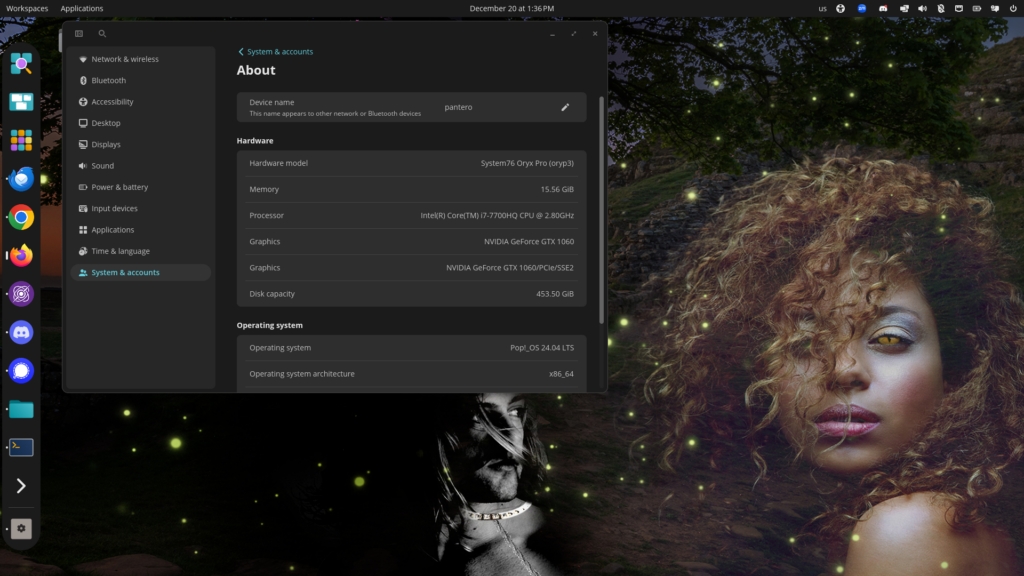
With the end of the semester, I decided to update early to Pop!_OS 24.04 LTS which just became available. I wanted to give myself as much time as possible if it failed or had serious problems. But, knowing System76, I needn’t have worried. The whole process only took a short while and went very smoothly.

At first, I was bit worried when I checked the requirements. My laptop, a 2018-ish System76 Oryx (oryp3) has an NVIDIA graphics card, so I assumed I would want to use the version for NVIDIA. But that version required a 16xx card or higher. The oryp3 only has a GTX1060. Luckily there was a separate generic upgrade that supports this class of hardware.

The biggest difference is that System76 has developed a new desktop interface called COSMIC. I’ve never been particularly happy with GNOME and actually preferred the previous Unity interface quite a bit more. The main reason I wanted to update, however, was to jump to the newer LTS release of Ubuntu upon which it’s based, to make sure I’ll be able to stay current with security patches. And I didn’t want to have to update during the middle of the semester when there might be time pressure if things went south.

So far, I’ve encountered only a handful of minor differences from the previous version. Some of the utilities are different. I needed to install the third-party packages I had installed separately (e.g. Zoom and Pulsar). And some of the configuration options are slightly different. But I’ve not encountered any showstoppers. Everything just works. My audio works. The Camera works. My portrait monitor is seamlessly supported. I can put the dock where I want it. All of my apps just work, including the X-windows app (Digikam) that I run from my home server. I was even able to easily make a screenshot (see above).

Note that the wallpaper is not from COSMIC, but rather is the cover graphic from my new book A Familiar Problem — Buy your copy today! 🙂

Kudos to System76! I never fail to be impressed with the high quality of their hardware and software.

I’ve just finished a new manuscript called Uplands. It’s a sequel to a story I wrote about a year ago called Bottomlands. They’re dark fantasy short stories about a witch and her familiar.

I was thinking I might want to write more stories in the series and was grasping for more words that end with -lands. I pretty quickly thought of grasslands and barrowlands, but then I was kind of stumped. I went to do a websearch, but how do you search for -lands?

This is a job for regular expressions, I thought.

I poked around for a few minutes to see if I already didn’t have a dictionary file on my computer, but pretty quickly I decided to just download this list of 479k English words for this purpose. The Internet is still useful for a few things.

Then I crafted my regular expression using the unix utility egrep. I went through a couple of iterations to get it just right, but ended up with this:

egrep '^[a-z].+lands$'  ~/Downloads/words.txt

It looks through the file for words that end in “lands” and that aren’t capitalized (so you don’t get Netherlands, for example).

I ended up with 53 words. I think that’s more stories than I’ll want to write in this series. Some of the words are pretty good too! (e.g. badlands, borderlands, hinterlands all seem good for dark fantasy). Some don’t seem so useful (e.g. islands, lallands, playlands).

Interestingly, barrowlands wasn’t among the words. Go figure.

I finally paid for the pro version of Independent Analytics that provides traffic analysis for my website. The free version really provides enough. But I like the system well enough that I wanted to provide support for them to encourage further development. I purchased a permanent license.

My author website is (mostly) the first site I’ve tried to build in WordPress. (Although I did set up a Comic Press site for Doctor Emery’s Nightmares back in the day.) In my previous career, I set up hand-coded websites in HTML and was an expert with Drupal which I used to set up websites for a bunch of organizations. But, when I wanted to build an author site, I decided that WordPress was probably the best fit for what I was trying to do. (In large part because my hosting service, Dreamhost, did the install and does the maintenance for the system. It’s not like I can’t do that for myself, but it means I spend less time worrying about tracking and applying security patches.)

After I set up my website, I was interested in getting usage statistics, but WordPress doesn’t really provide any natively. I looked around a bit and settled on the Independent Analytics plugin as the best fit for my needs. It is attractively designed, provides almost all of the basic functionality that you might want, and has some gentle teasers for advanced functionality you can unlock by purchasing the “pro” version.

The main thing you can do with the pro version, is run “campaigns” that let you collect data to compare and test different approaches. It also provides a very pretty overview dashboard with the basic statistics. It’s probably overkill for what I’m trying to do. But, as I say, the free version is really plenty to provide the basic functionality anyone would want.

One thing most people probably haven’t thought much about is the autonomy of so-called AIs. (Note: Large Language Models are not actually “intelligent” in the way people think of intelligence and people tend to project intelligence onto their behavior. But for the sake of convenience, I’ll call them AI anyway). Who actually controls AIs?

People assume that AIs are “trained” on “data” and then behave autonomously in response to the prompts they’re given. That’s sometimes true. But in many ways, their behavior is often secretly constrained. When Google’s photo recognition software mistakenly identified an African American as a gorilla, the company simply put in a hard limit so that the AI would never report recognizing anything as a gorilla. But none of this is visible to the end user. Most of the current AIs are probably full of hacks like these to prevent the AI from making common sense blunders that would get the company in trouble. But what other kinds of hacks might be in place?

If you’re a company producing an AI, there are all kinds of things you might wish your AI would do if used in particular circumstances. Or by particular people: your opponents, say. Or politicians. How irresistible will it be to corporations that make AIs to make them act in ways that benefit the corporation when given the opportunity? Anyone who knows corporations will know that it will be totally irresistible.

More importantly, when was the last time you heard of a corporation getting it’s network compromised. Yesterday? This morning? Ten minutes ago? It happens all the time. What happens when one of these AIs get compromised? How do you know the AIs you’ve been using up until now haven’t already been compromised?

Humans sometimes get compromised too. If someone gets kompromat on a person, like a pee tape for example, they might be able to get them to do nearly anything: even become a traitor to their country. And, of course, people are notoriously susceptible to inducements: e.g. money, sex, drugs. Or to become a mole or traitor for revenge. There are a bunch of huge differences between human treachery and a compromised AI. But one difference should give you pause.

We have deep experience with human treachery. We all know hundreds or thousands of examples of it throughout recorded history. There is legal precedent and volumes of case law for how to handle it. We have no experience with what happens when an AI gets compromised and begins to systematically undermine the agenda of the user. Who is responsible? Who decides? What’s the liability? Nobody knows.

Personally, I don’t use AI for anything. Not for important things. Not for unimportant things. Not for anything. That may seem like an extreme position. But I think that once many people begin to use AI, they’ll quickly become dependent on it and will find it much harder to recognize the subtle ways that AI — or whoever is actually controlling it — may be using them.

Authors should take backups seriously. And not just depend on free corporate solutions. I’ve read about people who trusted “the cloud” to keep their data safe only to have some faceless corporation invalidate their account and cause them lose everything overnight with no recourse.

Just like how, if you see “the economy” in a news article you should mentally replace it with “rich people’s yacht money”, when you see “the cloud” in a sentence, you should replace it with “someone else’s computer.” You shouldn’t trust someone else’s computer with your backups.

I’ve never been particularly strategic about backups. At least not since I was a doctoral student. While I was working on my dissertation, I became paranoid about losing my doctoral work. To reduce my anxiety, I got two Syquest EZ-135 drives and three cartridges that I rotated between my home and office, so I was well protected against data loss.

Since I’ve started working exclusively from home, I’ve been using syncthing to mirror my working files among all my devices and using a backup drive to make periodic backups. But I’ve become a bit concerned about not having an off-site backup.

For several years, I’d considered building a Network Attached Storage (NAS) device but I hadn’t found a straightforward recipe that didn’t look like a lot of work. I like maker projects, but I decided in the end that I wanted a solution more robust than something I hacked together from a recipe.

After discussion and some research, Philip and I decided to purchase identical Synology DS224+ devices and configure them to offer reciprocal off-site backups for each other. They have two spinning 12TB hard-drives in RAID1, so each can have one drive fail without data loss. That gives each of us about 5TB of backup, which I think will be ample for our needs for the foreseeable future.

So far, I’ve been quite pleased with the device. It only took a few minutes to figure out how to set up all of our computers to use rsync via public-key ssh connections and I’ve set up crontab entries to run daily backups. I can easily set it up to do backups more frequently if that seems warranted. Currently it’s just syncing, but I think I could get fancy and have it do periodic snapshots to protect against accidentally deleted files.

It does have high-level tools that are more accessible for less technical people. But I was pleased to be able to use the familiar low-level tools at the command line. Hopefully, once everything is set up, it will just sit there chattering quietly and give me peace of mind that a drive failure won’t be a catastrophe.

Today, my university sent me a link to a mandatory cybersecurity training. In the HTML-formatted email, they included a link that looks like this:

https://university.matrixlnselu.com/training/home

But the actual link that would be opened goes to something like:

https://num9.safeclicks.protection.outlook.com/?url=https%3A%2F%2Fclick.marcon.university.edu%2F%3Fqs
%3D79af0e80a4fc65b28bc6d7truckf2e0620df074d3c5769b3901
732d80246a6a905559ef9d772af96560ba50bbfe6380c2309c565d
7e2c62631&data=05%7C02%7Csdbrewer%40university.edu%7Cb
702860502824bdd172f08dd421140a2%7C7bd08b0b13374dc194bb
d0b2e57a497f%7C0%7C0%7C638739364061829157%7CUngown%7CT
WFpbGZsb3d8eyJFbXBsex1hcGkiOnRydWUsIlYiOiIwLjAuMDAwMCI
sIlAiOiJXaW4zpenisFOIjoiTWFpbCIsIldUIjoyfQ%3D%3D%7C0%7
C%7C%7C&sdata=Km50bFeo%2FrVW4AtWPtduUM2FZQhKdYWbcJQZlS
7YNjE%3D&reserved=0

(note: these have been munged so they hopefully won’t work)

There are actually two redirections in the link above. First, the mail-system rewrites every URL you receive in email and replaces it with a database look up at outlook.com so that if they decide a URL is malicious (i.e. links to something they don’t like) they can make it so the link doesn’t work. The second redirect is done by the system that generates the original email: they want to keep track of who clicked on the link so they can generate metrics about who is reading their emails.

I replied to the email to say “This seems like a terrible security practice. URLs should go where they say they do. And if they don’t, employees should be trained to not click on them. Duh.”

I replied back to the sender (which opened a “ticket” with IT) and I copied the Chief Information Officer of the university, whom I’ve known for many, many years. He replied first, “I hear you” he said. But he made it clear this is just what we’re doing now.

I pointed out that I’ve always tried to teach people to never click on links like that which leak information information about your browsing activity. I spent most of my career pushing back against this kind of enshittification. But to little avail seemingly.

We went on to exchange a couple more emails about feeling like grumpy old men complaining about the young whippersnappers who can’t read packet captures or “parse a coredump to save themselves.”

University IT replied later to close the ticket and say, “Thanks for the feedback. We will take it into consideration for future training notifications.” Heh. Right.