
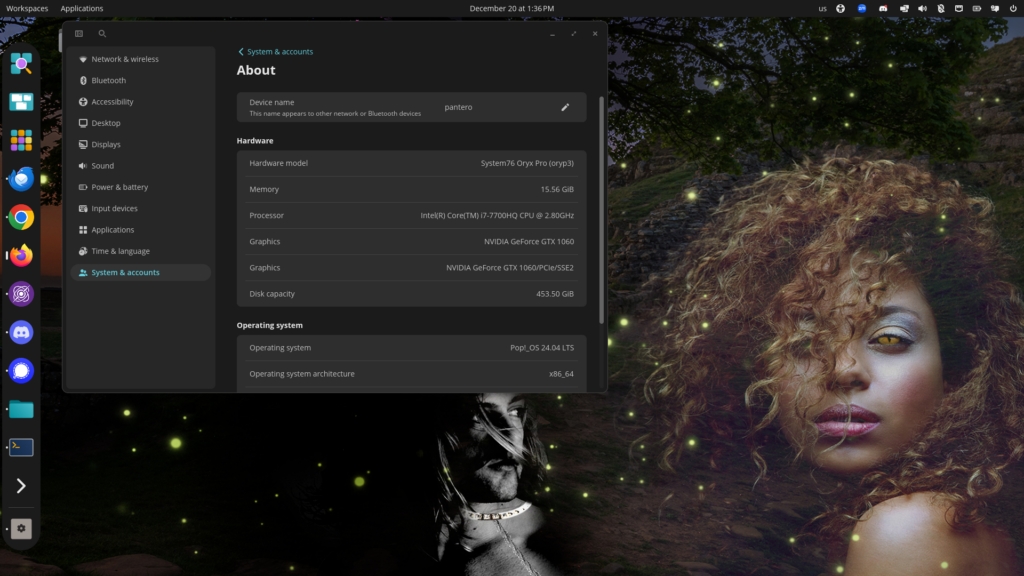
With the end of the semester, I decided to update early to Pop!_OS 24.04 LTS which just became available. I wanted to give myself as much time as possible if it failed or had serious problems. But, knowing System76, I needn’t have worried. The whole process only took a short while and went very smoothly.
At first, I was bit worried when I checked the requirements. My laptop, a 2018-ish System76 Oryx (oryp3) has an NVIDIA graphics card, so I assumed I would want to use the version for NVIDIA. But that version required a 16xx card or higher. The oryp3 only has a GTX1060. Luckily there was a separate generic upgrade that supports this class of hardware.
The biggest difference is that System76 has developed a new desktop interface called COSMIC. I’ve never been particularly happy with GNOME and actually preferred the previous Unity interface quite a bit more. The main reason I wanted to update, however, was to jump to the newer LTS release of Ubuntu upon which it’s based, to make sure I’ll be able to stay current with security patches. And I didn’t want to have to update during the middle of the semester when there might be time pressure if things went south.
So far, I’ve encountered only a handful of minor differences from the previous version. Some of the utilities are different. I needed to install the third-party packages I had installed separately (e.g. Zoom and Pulsar). And some of the configuration options are slightly different. But I’ve not encountered any showstoppers. Everything just works. My audio works. The Camera works. My portrait monitor is seamlessly supported. I can put the dock where I want it. All of my apps just work, including the X-windows app (Digikam) that I run from my home server. I was even able to easily make a screenshot (see above).
Note that the wallpaper is not from COSMIC, but rather is the cover graphic from my new book A Familiar Problem — Buy your copy today! 🙂
Kudos to System76! I never fail to be impressed with the high quality of their hardware and software.
Now that I’ve used COSMIC for a couple of weeks, I’ve identified a number of minor problems that I would like to see fixed.
I would really like to be able to put the mouse all the way to the right of a maximized window and still be able to scroll with the mouse wheel. Currently, you have to move the mouse a few pixels to the left.
Currently the ability to enter unicode code-point entries doesn’t work in COSMIC apps and works inconsistently in others. The Keyboard Layout applet also doesn’t seem to exist. There is a menu entry for it in the input-source settings, but it doesn’t do anthing.
Some of the COSMIC applets have rough edges. The COSMIC Files interface needs to allow you to re-order items in the sidebar. The COSMIC Screenshot applet can’t be moved. Sometimes, it would be convenient to see what’s under it when trying to make a screenshot.
The Dock requires you to select a window when you click on an app with multiple windows open. I would really like to be able to simply click to rotate through windows. It’s never convenient to have to pick a window. Also, when you select a window, it jumps your mouse to that window. Don’t do that! Don’t ever move my mouse! I always want to move the mouse myself.
The notifications system is only partially built: currently they show up very briefly at the upper-right hand corner of the active display and don’t do anything when you click on them. It would be ideal to be able to have notifications show up consistently in one place and take you to the app that made the notification. There also needs to be a way to see the notification history.